If you want a budget streaming device for live sports and travel, choosing between the Onn 4K Plus vs. Onn 4K Stick can make or break your game day.
To stream live broadcasts smoothly, you need steady processing power and a reliable internet connection. This is especially important when using sports apps on hotel or rental networks.
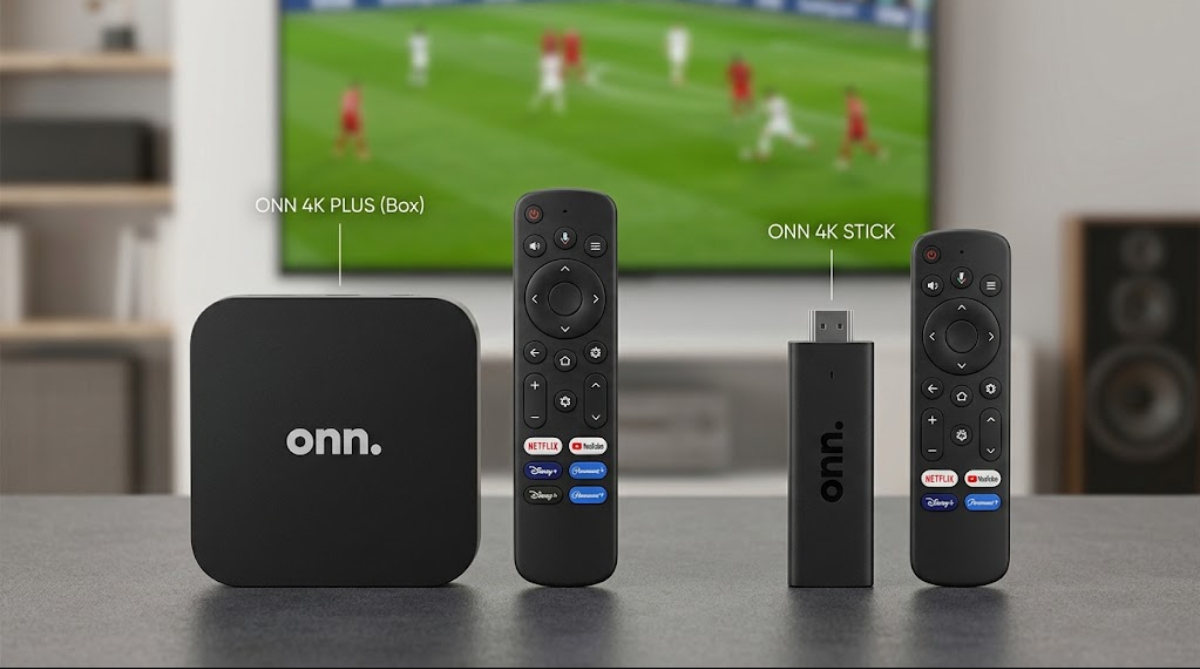
Both devices are affordable ways to access Google TV, but their hardware differences become clear when you use them in real situations.
1. Processing power
Sports fans need smooth frame rates and fast app switching. Watching a fast football or hockey game at 60 frames per second requires a processor that can keep up without slowing down.
The Onn 4K Plus uses a quad-core Amlogic S905X5M processor at 2.5 GHz, which makes the interface feel responsive, and apps open quickly.
The Onn 4K Stick has a less powerful processor and can lag when switching between live TV apps like YouTube TV, Fubo, or Peacock.
2. Wi-Fi 6 connectivity

When you travel, hotel TVs and crowded Wi-Fi networks often make streaming difficult.
The Onn 4K Plus supports Wi-Fi 6, so it can keep fast wireless speeds even on busy public networks.
The Onn 4K Stick uses older Wi-Fi, so you may see more buffering or sudden drops in video quality during live broadcasts.
3. Internal storage limits and app support
Storage is another big difference. The Onn 4K Plus has 16GB of space, so you can install lots of streaming apps and travel tools like VPNs.
Most streaming sticks have only 8GB of storage, which fills up quickly after adding a few main apps and updates.
4. Portability
The Onn 4K Stick wins for portability because it plugs straight into the TV’s HDMI port without any extra cables.
In hotel rooms, TVs are often wall-mounted, leaving little space for HDMI sticks, so you might need an extension adapter to connect them.
The Onn 4K Plus is a small box that uses a short HDMI cable, so it fits easily behind tight spaces on most TVs.
5. Power reliability
Power supply matters when traveling. Many people try to use USB ports on hotel TVs to power their streaming sticks.
These USB ports often do not provide enough power and can cause your device to restart randomly during 4K streaming.
The Onn 4K Plus comes with its own USB-C power block that gives steady power, so you won’t have to worry about crashes during important moments.
6. HDR10 vs. Dolby Vision support
Both devices support 4K Ultra HD, HDR10, and Dolby Atmos for picture and sound.
But the Onn 4K Plus also supports Dolby Vision, which gives you better colors and contrast for movies and sports that use it.
This means bright daytime games and dark evening matches look clear on various TVs.
7. RAM allocation
A device’s memory affects how easily you can check scores on different live streams. The Onn 4K Plus has 2GB of RAM, so it keeps apps running in the background longer than basic sticks.
This extra memory lets you switch between a live game and a sports news channel without waiting for the app to reload.
8. Remote control navigation and shortcuts
The remotes also show some real differences. The Onn 4K Plus remote has shortcut buttons you can set for your favorite sports app or live TV guide.
You can use Google Assistant to search by voice, making it easy to find team names or game times without typing.
9. Price-to-value breakdown
If you are looking for value, the small price difference is worth it for the Onn 4K Plus. You get twice the storage, faster performance, Wi-Fi 6, and better HDR support.
Over time, these upgrades help you avoid frozen streams and storage shortages while traveling and watching live sports.
Onn 4K Plus vs Onn 4K Stick: Which one should you pick?
The Onn 4K Stick is fine for casual watching, but it lacks the processing power you need for live sports.
The Onn 4K Plus is both portable and powerful, making it the best choice for sports fans and travelers who want reliable streaming on the go.