At first glance, both the Onn 4K Plus and Roku Streaming Stick look like affordable ways for you to get 4K HDR streaming.
But when you dig into their composition, you’ll find meaningful differences in the two. They have distinct hardware, software, supported formats, and real-world behavior.
These differences matter when you’re watching on a living-room screen.
Reasons why the Onn 4K Plus might beat your Roku Streaming Stick
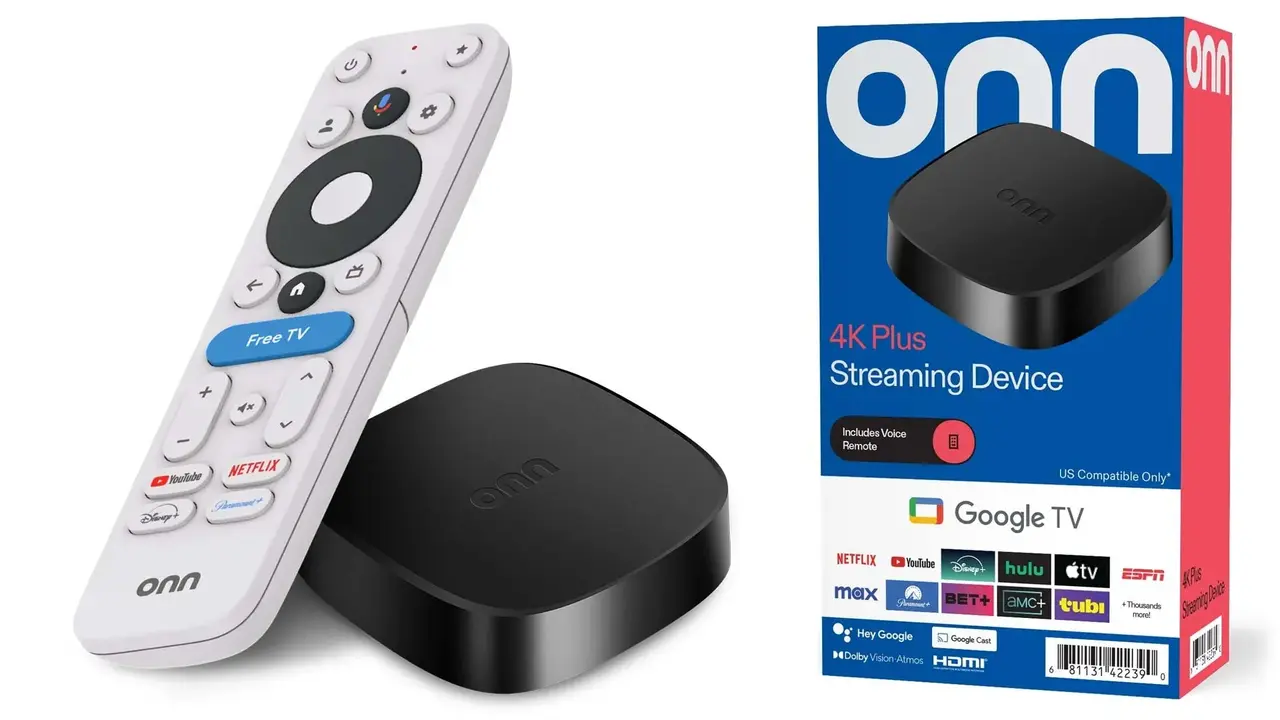
Onn ships several different 4K models (Box, Pro, Plus, Stick). The “Plus” model is positioned between the cheapest Onn models and the Pro. Below, we unpack the advantages this device offers over Roku:
1. Google TV OS
One of the clearest differences is software. The Onn 4K Plus runs Google TV. This open-source OS includes the broader Android/Google ecosystem, plus Chromecast built in.
With this Walmart gadget, you can cast from nearly any Android app or Chrome tab directly to your set. You could also start a YouTube Music queue on your phone and cast it to the TV, use Google Photos as a screensaver, and much more.
These flows are simply easier on Google TV than they are on Roku’s more curated platform.
2. Dolby Vision support
The Onn 4K Plus features the Dolby Vision support at its price point. With a TV set that supports the tech, sources mastered for such a quality will look closer to production quality on an Onn 4K Plus compared to a stick that only supports HDR10/HDR10+ or lacks Dolby Vision entirely.
If you watch a lot of HDR-enabled content from Disney+, Apple TV+, Netflix’s Dolby Vision catalogues, Dolby Vision yields visibly richer highlights and cleaner shadow detail on scenes with complex lighting.
Roku’s Streaming Stick 4K supports Dolby Vision, but earlier/cheaper Roku sticks and some “Plus” variants emphasize HDR10/HLG instead.
3. Faster CPU
The Onn 4K Plus uses a modern Amlogic S905X5M-series chipset, clocked higher than those in older budget streamers. This brings competent CPU/GPU performance for Android TV tasks.
The fast CPU gives you faster app launches and smoother UI animations in Google TV. It can also handle the performance needed for lightweight Android games and will have fewer hiccups when switching between heavy apps.
That said, the Roku OS is extremely optimized. A faster raw CPU doesn’t always translate to perceptible UI speed in Roku’s verticalized environment. But if you plan to use Android apps or do any sideloading, Onn’s chipset advantage matters.
4. Storage and memory
The Onn 4K Plus ships with 16GB of internal storage and 2GB of RAM. In the budget streamer market, many devices scrimp on storage (8GB or less) and RAM (1–1.5GB), which quickly becomes a pain if you install several apps or updates.
With Onn, you can keep more apps installed without storage warnings and updates failing.
Roku sticks traditionally ship with limited storage because Roku channels are small and Roku OS is compact.
That’s fine if you live inside Roku’s channel ecosystem, but if you want to use additional Android apps or sideload things (emulators, alternative players), Onn’s larger storage is functionally better.
5. USB-C power
The Onn 4K Plus uses USB-C power instead of micro-USB or barrel connectors on older, cheap sticks. The USB-C power is more reliable with modern power banks, and often allows for higher and steadier power delivery.
For travel, you can power the Onn from a phone charger in a hotel room rather than hunting for the right adapter.

Roku Streaming Stick models similarly can be powered via USB ports, but the standardized USB-C on Onn makes cable management simpler.
6. Native Google Assistant and ecosystem integrations
Onn’s Google TV platform gives you native Google Assistant on the remote and deep integrations with Google Home routines and other devices. You can ask the remote to “turn on the living room lights” or “set the thermostat” and run automations without leaving the TV.
Roku has its own voice and assistant integrations (voice remote, Alexa, mobile-app private listening). But Google Assistant’s breadth and its ties to Android devices and Google Photos give Onn a practical edge if you live in Google’s ecosystem.
7. Price-to-performance
Another reason why the Onn 4K Plus might beat your Roku Streaming Stick is that it launched at an aggressively low price of around $29 to $39.
That quotation, combined with features like Dolby Vision, means you get more for your money. There is also Chromecast support and a modern CPU, features you’d normally pay more for on other brands.
Its rival costs anywhere between $24.99 and about $49.99. The exact price depends on the model. Comparable models to the Onn lack the premium features it offers.
What the Roku Streaming Stick still beats the Onn on
Below are the concrete areas where Roku still outperforms the Onn 4K Plus in real-world use:
1. OS polish, UI snappiness, and unified channel experience
Roku’s greatest strength is its software. The Roku OS is intentionally simple, extremely optimized, and uniformly fast on even modest hardware.
If you want predictable, low-friction navigation where apps launch quickly and search feels consistent across services, Roku’s platform often “feels” faster and cleaner.
2. Predictable app support and longevity of platform updates
Roku has a long track record of supporting its OS with consistent updates and broad channel support. Because Roku’s platform is vertically controlled, channel developers target it heavily, which means apps are often more stable and features arrive reliably across Roku devices.
Onn’s Google TV benefits from Google’s ecosystem, but some device-specific quirks and update variability have been reported with budget Android TV boxes historically.
3. Private listening and mobile app
Roku’s mobile app integrates tightly with the platform for quick pairing. The app supports features like voice search and remote control.
It also has private listening, which works reliably. On higher-tier remotes, you have more features. There are headphone jacks, rechargeable batteries, and the lost-remote finding tech.

When to choose Onn 4K Plus over a Roku Streaming Stick
Here is a brief breakdown on where or when you should go for Onn 4K Plus:
- If you value picture fidelity above UI minimalism and your TV supports Dolby Vision. You also watch a lot of Dolby Vision–graded material from Netflix, Disney+, and Apple TV+.
- If you live inside Google services, you use Google Photos, Google Assistant, or frequently cast from Android devices, its native Google TV + Chromecast integration will make your life easier.
- If you plan to sideload Android apps or use local Android apps, Onn is the clear winner. It is also the better option for more storage.
- If your decision is influenced by having the most features for the least money, this is hard to beat. Onn boasts of Dolby Vision, USB-C, Chromecast, Google Assistant, and much more.
When to keep or choose Roku over Onn 4K Plus
Conversely, here are clear scenarios where Roku still should be your pick:
- If you prefer a TV that anyone can use, parents, kids, guests, without explanation, Roku’s UI is consistently one of the easiest.
- For mission-critical streaming (sports apps, niche live networks), Roku’s app stability is worth the trade-off.
- If you frequently use the mobile app’s private listening or prefer advanced remote hardware features (rechargeable remotes, headphone jack on the Voice Remote Pro), Roku’s remote ecosystem is more mature and integrated than the base Onn Google TV experience.