Spotify gives you more control over video content in the app. With their latest version installed on your device, you can actually turn off music videos.
You can also do away with Canvas loops and other video content, such as video podcasts, creator videos, fitness videos, and audiobook trailers.
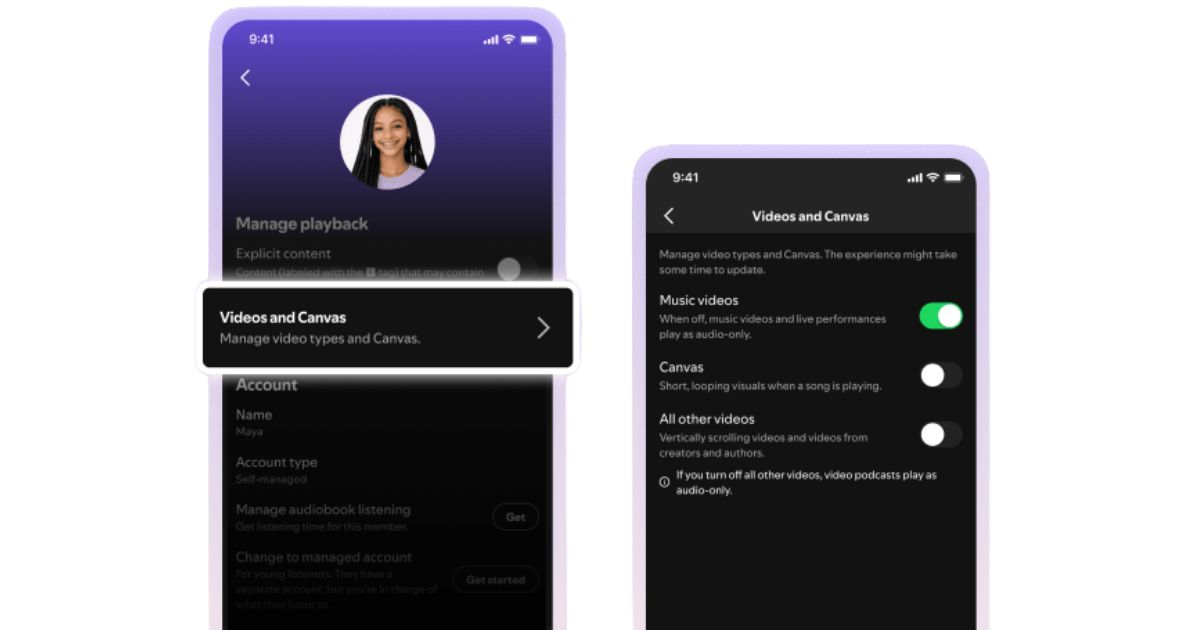
Below is how to turn off videos on Spotify, what the settings control, and what you still cannot disable.
What Spotify’s video controls do
Spotify has been doubling down on more video features over the years. Their platform has grown to host music videos and video podcasts. Recently, they have also added short vertical videos, creator clips, and Canvas loops that play on the “Now Playing” screen.
That has been useful if you enjoy a more visual experience. But not everyone wants Spotify to feel like a video app. You might only want music, podcasts, audiobooks, and a clean audio screen.
There are controls meant to solve that problem. You could choose whether the video appears in your Spotify experience across your devices.
How to turn off video content on Spotify
Follow these steps to do so:
- Open the Spotify app: Start from your Spotify home screen on your gadget.
- Go to Settings: Tap your profile picture or your settings icon. The exact place to press will depend on your device.
- Open Content and display: This is where Spotify places the video and Canvas controls on mobile. On a desktop, the settings appear under a display-related section.
- Find Videos and Canvas: Look for the section that controls video content and looping visuals.
- Turn off Music videos: This will stop music videos and live performance videos from appearing in your Spotify experience.
- Turn off Other videos: Works for video podcasts, creator videos, vertical videos, fitness videos, and audiobook trailers.
- Turn off Canvas: This will remove the short looping visuals. Such appear on the Now Playing screen when a song is playing.
- Restart Spotify if the settings do not appear to work immediately: Because the rollout is still fresh, you first need to update the app. If nothing changes, close and reopen it, or wait for the settings to appear on your account.
Can you turn off all Spotify videos?
No. Spotify’s ads, which are normally videos, cannot be turned off. If you use Spotify’s free ad-supported plan, you will still see video ads. As a free user, you will also see Canvas-like visuals with some audio ads.
So the setting does not mean Spotify becomes completely video-free in every situation.