Kanopy is an on-demand streaming service with a massive library of over 30,000 digital content titles. But, unlike other streaming services like Netflix, the platform caters to public libraries and universities.
Kanopy’s extensive library of content is a strong incentive for joining the platform. But, before you sign up, there are a few more things you should know about the streaming service.
Below is a detailed review of Kanopy, covering everything from how the platform works to costs, content offered, availability, and how to join.
1. How does the Kanopy streaming service work?
As already mentioned, Kanopy caters to public libraries and universities. What this means is that, unlike most streaming services, users must be members of participating libraries or universities.
Its mode of operation is similar to that of Hoopla and Libby, two other streaming services that offer access to content via public libraries.
Below is a detailed look at how the platform works for both public libraries and universities.
Public libraries
Kanopy partners with over 4,000 public libraries. You can use your library card to join the streaming platform if you are a member of any one of these libraries.
You can use the Kanopy Library Map Finder to find out if your library has a partnership with Kanopy.
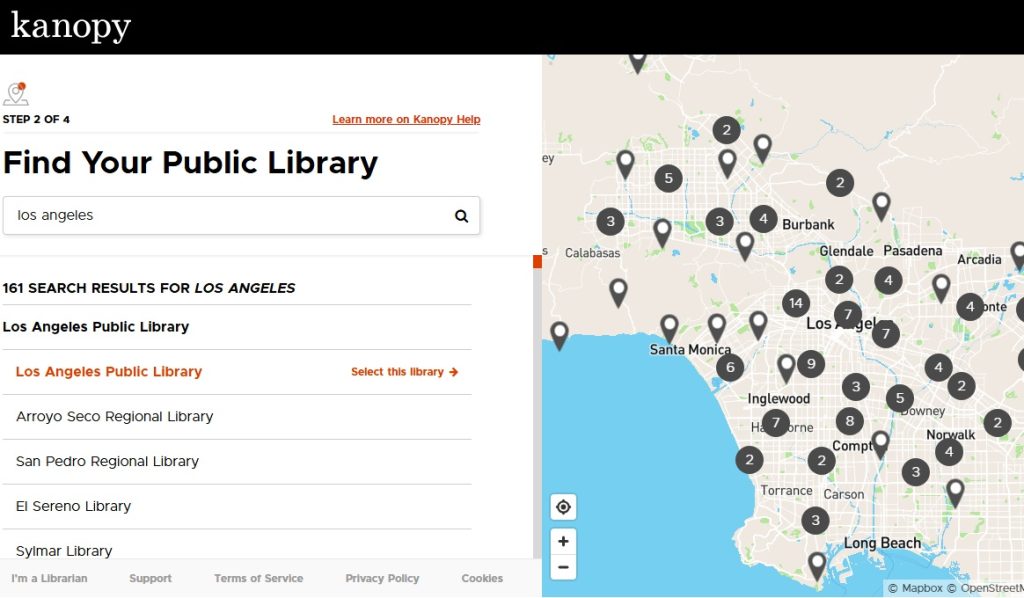
You can also search for participating libraries by location. This way, if your current library does not have Kanopy, you can find another library near you that offers the service, and join it to gain access to the platform.
Universities
Kanopy partners with over 1,000 universities, colleges, and educational institutions, including popular institutions such as Stanford, Harvard, the University of Pennsylvania, Columbia, and Howard University.
Student and faculty members of these institutions can use their university credentials to join the streaming platform. In some cases, alum members with valid credentials can also join Kanopy.
How to access Kanopy
You need to be a member of a participating public library or university to join Kanopy. Once you have joined, you can access the platform via several devices, just like any other streaming service.
Supported devices include:
- Computers and internet-connected devices via the Kanopy website.
- Mobile devices via the Kanopy app that is available on Google Play Store, Apple App Store, and Amazon Appstore.
- Smart TVs – Google TV, Roku, and Samsung TV.
- Apple TV
- Fire TV devices
- Roku
- Google streaming devices – Chromecast, Android TV boxes, and more.
2. How much does Kanopy cost?
Kanopy is free for its users. In addition, unlike free streaming services like Tubi and Pluto, the platform is ad-free.
The idea of a free, ad-free streaming service sounds too good to be true, but it is not. So, how then does Kanopy earn money?
Kanopy uses a unique revenue model, where it charges participating libraries and universities a fee every time a patron accesses content from the platform.
For public libraries, the cost is around $2 per access, with the fee charged every time a patron watches a video for more than 30 seconds.
Universities are charged on an annual basis, with a fee of $150 for a 1-year license (per title), when a title is watched four or more times during a 12-month period. If a title does not attain four views during this period, universities are not charged.
Due to Kanopy’s unique revenue model, public libraries and universities often restrict how many titles a user can access in a given month. The limits help to ensure that the fees incurred by the institutions don’t exceed their set budget for the Kanopy service.
Kanopy’s limits vary by institution depending on its budget, but most offer between 4 and 10 titles a month. These limits reset at the beginning of each calendar month, with any unused tickets by a patron expiring; they don’t roll over into the next month.
Some universities might also have more restrictions due to Kanopy’s annual pricing model. For example, some institutions require mediated access through faculty, hence removing the possibility of students triggering annual licenses for multiple titles.
3. What type of content can you find on Kanopy?
Kanopy offers a variety of on-demand content, which includes films, documentaries, TV shows, and more.
The content is sourced from various content partners, including production companies, independent filmmakers, and content distributors like Paramount and A24.
Since the platform is geared towards academia, a considerable amount of its content is educational.
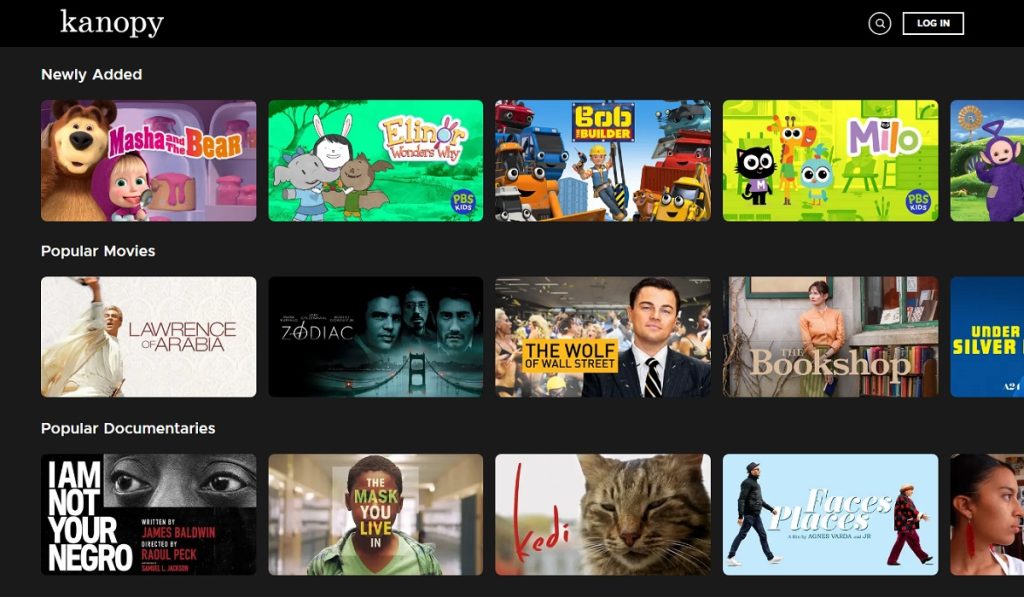
Below is a detailed look at some of the content you can find on Kanopy:
- Movies: The platform offers thousands of movie titles, including independent films, foreign films, classic cinema, horror films, comedies, and more.
- Documentaries: You can find a variety of documentary films about several topics, including history, arts, culture, nature, social issues, and more.
- TV shows: Kanopy’s library features a wide range of TV shows, from critically acclaimed series to literary adaptations, classic shows, docuseries, historical dramas, and contemporary entertaining shows.
- Learning content: Kanopy offers a variety of educational content suitable for different audiences, including kids, high school students, higher learning, and hobbyists.
- Kids content: The streaming service has a dedicated kids’ section that features a variety of content, including storybooks, educational shows, kid-friendly movies & TV shows, funny videos, and more.
4. Where is Kanopy available?
Kanopy is available in over 53 countries, with participating libraries and universities spread across the world.
However, the primary market for the streaming service is in:
- The United States
- Canada
- United Kingdom
- Australia
- New Zealand
However, the service is also available in other regions, including:
- Europe: Germany, Ireland, France, Finland, Italy, Norway, Spain, Sweden, Switzerland, and more.
- Asia Pacific: Singapore, Hong Kong, Malaysia, and Taiwan.
- Latin America: Argentina, Mexico, Colombia, Chile, Peru, Ecuador, and Costa Rica.
- Middle East/Africa: Israel and South Africa.
It is also worth noting that access to Kanopy is via institutions, not geographical locations. Therefore, members of participating libraries and universities can access the platform without restrictions, even when travelling abroad.
Additionally, some public libraries offer online memberships to non-resident users. Therefore, such a move could allow an individual outside the available countries to have access to the streaming platform.
5. How to join Kanopy?
Joining Kanopy is a straightforward process. Below is a step-by-step process for signing up for the streaming service.
- Go to the platform’s official website on your PC browser and click on “Get Started.”
- Choose how to access the platform: via your library or university.
- If you go with the library option, locate your library on the Kanopy map – you can search for it by name, city, or zip code.
- Enter your library card number and the card PIN/password.
- Use your email (or log in with a Google or Facebook account) to create your Kanopy profile and start accessing content.
If you are accessing Kanoy via your university, follow the steps below:
- Search for your university by name on Kanopy.
- Click on the “Log in” button – a pop-up window will then appear requesting you to log in via your institution.
- Enter your university credentials to log in and follow the on-screen prompts to create your profile and start accessing content.
Note: If using the library option, you can add more than one participating library to your account. You can then combine tickets from each library to access more content beyond their individual monthly limits.