Are you having a hard time keeping track of the movies you want to watch on Roku? Due to the constant influx of content, it can be hard to keep up with the titles you want to watch.
However, Roku now offers a save list that lets you save your favorite movie titles on the platform for later streaming. In this guide, we will show you how to save movies and other content on your Roku device.

What is the Save List on Roku?
The Save List is a built-in feature that lets you bookmark movies and TV shows you want to watch later. It is a handy tool that enables you to save your favorite titles in one place, making it easy to track the content you want to watch.
One thing to note, though, is that saving a movie on Roku does not download it. Instead, it creates a shortcut that helps you to quickly start streaming once you are ready to watch.
The Roku Save List is available across all Roku devices. Therefore, you can access it on your Roku mobile app, Roku TV/streaming device, or your Roku account online.
How to save a movie on the Roku mobile app?
It’s very easy to save a movie or TV show title on your Roku mobile app. Below is a look at how to do it:
- Launch the Roku app on your mobile device.
- Browse through the app to find a movie or TV show you want to save. You can also discover titles by using the search function.
- Select the title you want to save and tap on the + that’s preceding Save
- Immediately after, the Save button will turn to Saved.
- Repeat the steps above for other titles you want to save.
Once saved, the movie or TV show will be added to your Save List, which you can access from the home screen. The list will also be synced across all your devices.
To watch a saved movie, tap on it from the Save List, and Roku will bring it up and show you all the ways you can watch it.
How to save a movie on a Roku streaming device?
Below is a look at how to save a movie on Roku if using a Roku TV or a Roku streaming device:
- Press the Home button on your Roku remote.
- Browse through the library or use the search function to find a movie or TV show title you want to save. You can also use the Voice search feature on your remote if available.
- Select the desired title to bring up the details screen.
- Select Add to Save List to save the title; this will then turn to Added to Save List.
- Repeat the steps above for other titles.
How to save titles on Roku online
You can also save favorite titles on your Roku account online. Below is a look at how to do this:
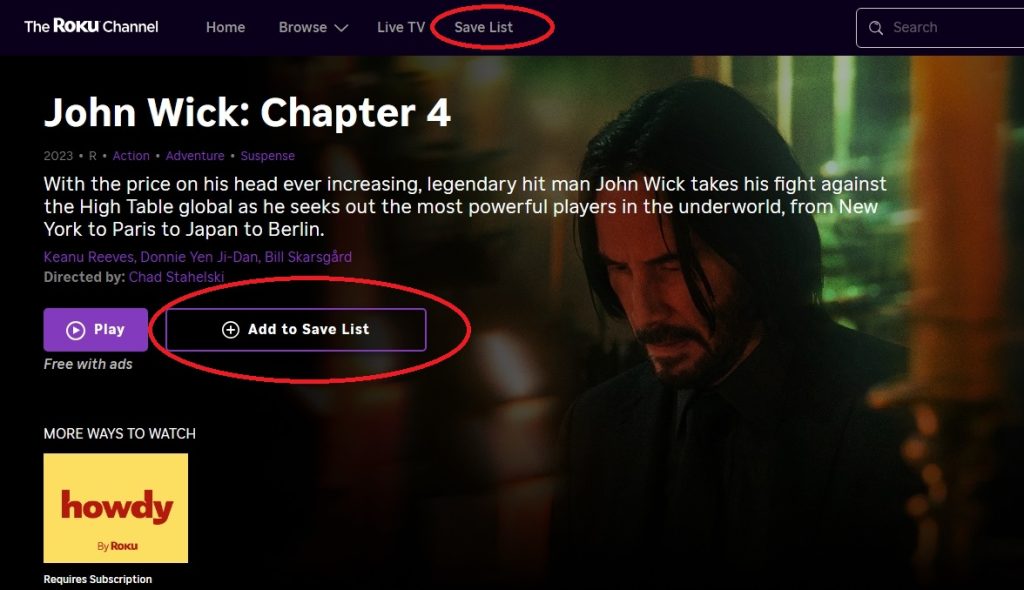
- Go to the Roku Channel website on a computer browser and log in to your Roku account.
- Browse through the library or use the search bar to find a title you want.
- Select the title you want to save, then click Add to Save List; it will then turn to Added to Save List.
- Repeat the process for other titles.
How to remove a title from the Save List?
If you have already watched a movie or your list is getting too crowded, you can remove some titles. Below is a look at how to do it:
- Access your Saved List from any Roku device.
- Click/tap Edit, then select the title(s) you want to delete.
- Select Remove to delete the title(s) from your save list.
Once you delete a movie or TV show, Roku will remove the title from your Save List on all your devices.