Is the BBC iPlayer app freezing on your smart TV? This can be a frustrating issue, but it is also very common when streaming content from BBC iPlayer.
The issue can be caused by a variety of factors, including internet connectivity issues, app glitches, cache-related issues, outdated firmware, and device memory issues. External factors, such as VPN use and server issues, can also cause the BBC iPlayer app to freeze on your TV.

The good news is that most of the underlying issues are easy to troubleshoot and fix. Below is a look at various troubleshooting steps and solutions you can attempt to get BBC iPlayer running smoothly again on your smart TV.
1. Check on your internet connection
Network issues are among the top reasons the BBC iPlayer app might keep freezing on your Smart TV. A slow or unstable internet connection can cause the app to buffer and freeze while streaming.
To fix the network connection issues:
- First, run a speed test on your Smart TV to ensure you have a fast connection that supports streaming. The BBC recommends a connection bandwidth of at least 1.5 Mbps for streaming standard-quality content and 5 Mbps for higher quality.
- If the network is slow or unstable, try connecting your TV to your internet router with an Ethernet cable instead of Wi-Fi.
- Also, reduce the number of devices connected to your router; the more devices you have, the more they compete for bandwidth, which can slow your connection.
- If the issue persists, restart your router; this can help to clear temporary glitches and boost internet speeds.
- If all else fails, contact your internet service provider for additional troubleshooting, or switch to an alternative network, for example, mobile broadband.
2. Restart the BBC iPlayer app
Restarting the BBC iPlayer app is one of the top solutions for resolving a persistent freezing issue. Restarting the app clears temporary data and resets its software state, which can help resolve glitches caused by corrupted data, overloaded system resources, or network conflicts.
To restart the BBC iPlayer app:
- Press the Back/Exit button on your remote repeatedly until you see a prompt to close the app (or quit). Note: pressing the Home button will not restart the app; it will just keep it running in the background.
- You can also use the Force close method on Android/Google TV: Settings > Apps > See all apps > BBC iPlayer > Force Stop.
- After closing the app, go back to the home screen, relaunch it, and check if the issue has been resolved.
- For better results, you can even sign out of your BBC iPlayer account before closing the app, then sign back in when you relaunch it.
3. Close other apps running on your TV
Insufficient memory can cause the BBC iPlayer app to keep freezing on your Smart TV. The memory issue can be caused by installing too many apps or by having several of them running simultaneously, which can overload available memory resources.
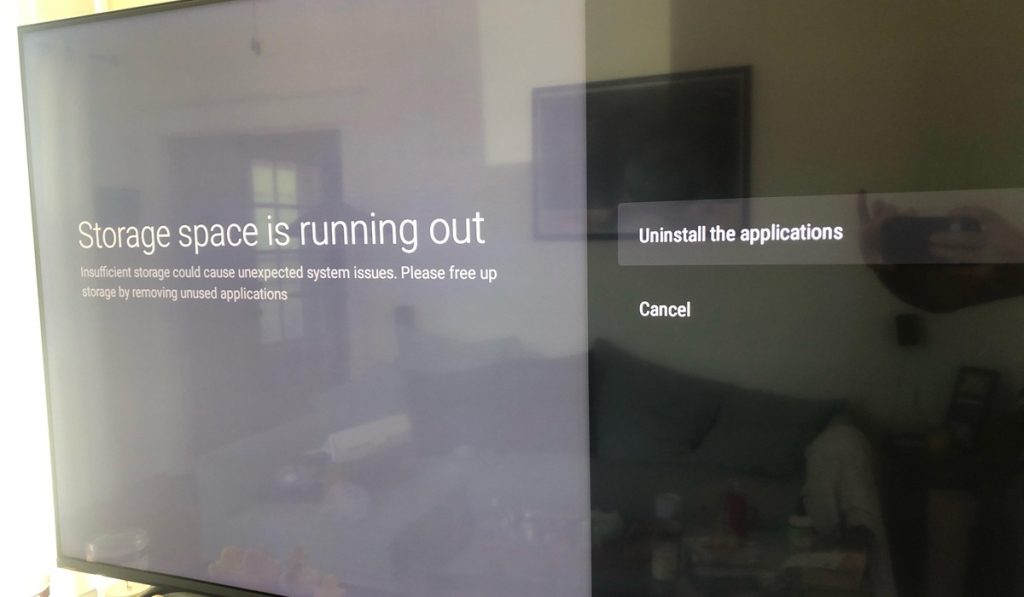
To fix the memory issue, close any other apps you are not using. You should also consider uninstalling apps you don’t regularly use, especially those that consume a lot of memory.
4. Restart your Smart TV
Smart TVs are like computers; they store temporary memory that can become corrupted, are prone to bugs and software glitches, and can become overloaded with background processes. All of these issues can cause apps like the BBC iPlayer to freeze or crash.
Fortunately, restarting your TV can help to fix these issues. A restart acts as a “soft reset,” which can resolve many of these issues and other temporary errors that could be causing your BBC iPlayer app to keep freezing.
There are two ways you can restart your smart TV:
Restart through TV settings
To restart your TV via settings:
- Go to Home > Settings > Device Preferences / About > Restart (Note: the exact path to restart may vary depending on your TV model).
You can also restart your Smart TV by long-pressing the power button on your remote until the TV turns off, then turning it back on.
Note: Simply pressing the power button on the remote once will not restart the TV; it will only place it in standby mode, which cannot resolve glitches or other issues.
Restart through power cycling
Power cycling is another option to restart your TV. To do this:
- Unplug your TV from the power outlet while it is still on.
- Press and hold the physical power button on your TV (not the remote) for about 15-30 seconds. This drains any residual power from the internal TV components.
- Wait for about 30-60 seconds.
- Plug the TV back into the power outlet and turn it on.
5. Clear BBC iPlayer cache
BBC iPlayer, like other apps, stores cached data to improve performance and provide a smoother user experience. However, over time, the cached data can become corrupted or overloaded, leading to a host of issues, including the app freezing or crashing.
Clearing the cache can help to resolve the issue with your app, allowing you to stream without any interruptions.
To clear the BBC iPlayer cache on your Smart TV:
- Go to Settings from your TV’s home screen.
- Select Apps > See All Apps /Manage Installed Applications
- Choose BBC iPlayer from the list of installed apps.
- Select Clear cache and press OK to confirm.
6. Update the BBC iPlayer app
A lack of updates is another reason the BBC iPlayer app might keep freezing on your Smart TV. Updates are vital for fixing software bugs, which can cause a host of app performance issues.
Failing to update your BBC iPlayer app can also cause compatibility issues, such as freezing or crashing during playback. The good news is that a simple update can help resolve all these issues.
To update BBC iPlayer on your Smart TV:
- Navigate to your TV app store and find BBC iPlayer.
- Check whether there’s an available update and install it.
- Restart the app and check whether the issue has been resolved.
7. Update your Smart TV firmware
Just like with apps, failing to update your Smart TV can cause a host of issues, including apps freezing during streaming. Therefore, in addition to updating the BBC iPlayer, you must ensure your Smart TV is up to date.
To update your smart TV:
- Ensure your TV is connected to the internet.
- Go to Settings from your home screen.
- Navigate to About/Support > Software Update/Support > Update Now.
- You can also enable the Auto-update option to ensure your TV installs updates as soon as they become available.
8. Reinstall the BBC iPlayer app
Are you still having issues with the BBC iPlayer app freezing on your TV? Then the problem could be with the app itself. In such a case, uninstalling the existing app and reinstalling a new version is worth a try.
To do this:
- From your Smart TV’s home screen, go to the Apps section or the App Store.
- Locate BBC iPlayer, highlight the app, then long-press the OK button on your remote.
- Select Uninstall or Delete to remove the app.
- After uninstalling the app, restart or power cycle your TV to ensure all data related to the existing version of the app is removed.
- Then, after powering on your TV, go to the App Store and search for BBC iPlayer.
- Install the new version of the app, then go back to the home screen, launch it, and see if the issue has been resolved.