Freeform isn’t “one app” you install and activate anymore. Disney shut down the Freeform mobile and connected-TV apps, along with several similar Disney network apps, starting September 23, 2024.
So today, “setting up Freeform” usually means one of three things. Watching Freeform using your cable/satellite TV provider login on Freeform’s website, through a live TV streaming service, or on-demand shows through a service that carries Freeform episodes.
The steps to activate and set up Freeform TV in this guide are divided into those three paths.
Option 1: You already pay for cable or satellite and want Freeform access
If you already have a cable active subscription, you do not need to install anything special on your electronic devices. This is, as mentioned earlier, that the Freeform app is gone. So the simplest official way would be to watch through Freeform.com and link your TV provider.
For this, we recommend that you have the following:
- A modern gadget that has access to the internet.
- Your pay TV provider username and password. These are the same ones you use to pay your cable bill or sign into your provider’s website/app.
- A stable internet connection, otherwise, you will experience a lot of glitches while watching.
Step A: Confirm your cable plan actually includes Freeform
This saves time because many “activation problems” are really “your package doesn’t include this channel.”
So, do this:
- Look at your provider’s channel lineup.
- Search the lineup for Freeform.
- If you don’t see it, your plan may not include it, and the login will often fail with “not authorized” or similar.
Step B: Activate Freeform by signing in with your TV provider
Below is the technique to follow:
- On your chosen gadget that is connected to the internet, open an updated browser. This could be Chrome, Safari, Edge, or so.
- Go to Freeform’s official site.
- Choose Watch Live.
- This live stream page will prompt you to sign in.
- Select Log In or account icon and choose Link TV Provider / Link your TV Provider.
- Pick your provider from the list.
- Enter the credentials given to you by your provider. These are your username/email and password.
- Approve any prompts. For security reasons, some providers ask you to confirm or use a code.
- Once you complete this successfully, go back to Freeform and try:
- Watch Live, and/or
- Full episodes from the Browse page.
Step C: Create or use a Freeform account if prompted
Sometimes Freeform also asks you to sign in using a Disney-family login (MyDisney). Their help pages describe creating an account and using an existing login if you already use other Disney services. Do the following:
- On Freeform, select Log In to Account.
- Enter your email.
- If you have or happen to remember your Disney Family login, use that same email/password.
- If you don’t have one, you could create a new account in under a minute here.
Option 2: Steps to activate and set up Freeform TV using a live TV streaming service.
You could also pay for a live TV streaming service that carries Freeform in its TV stations lineup. For this, you will watch the broadcast inside that service’s app. This is either on TV, phone, tablet, or browser.
Step A: Choose a service that fits your situation
Here’s a quick checklist that will help you narrow down to one choice:
- If you fancy “a like cable experience,” go for YouTube TV or DIRECTV STREAM
- For those who favor an on-demand library + live channels, Hulu + Live TV is the best.
- For sports-heavy bundles, then choose Fubo.
- If you are on a budget, the Sling Orange package has got you covered.
Note: Prices and channel lineups for all the above choices change. So always confirm that Freeform appears in the service’s current channel list before paying.
Step B: Activate your chosen live TV service
This part is similar for every service:
- On your gadget, go to the service website. You could also install its official app.
- Select Start / Sign Up.
- Enter your credentials, then email, and create a password.
- Choose your desired plan. Most base plans are usually enough if they include Freeform.
- Add a payment method to activate your subscription. This will be either a card or PayPal, depending on the service.
- Confirm the email you gave if they send a verification link.
Step C: Activate the service on your TV
Most TV apps use an activation code: the TV shows a code, and you type it on a website using your phone. Here is how:
- On your TV set or streaming device, open the chosen streaming service app.
- Choose Sign In.
- If you see “Sign in on your TV,” you can enter your email/password with the remote.
- If you see “Sign in on the web / Activate”:
- Your set will show a short code, like 6–8 characters.
- Open the link on your display with another device.
- Type the code.
- Wait for your set to confirm you’re signed in.
Step D: Find Freeform in the Live guide
Once signed in:
- Open Live or Guide in the service.
- Search for Freeform.
- Select the channel.
- Choose Add to Favorites. This guarantees you don’t have to search again.
Option 3: You only want Freeform on-demand shows
This is the best option if you don’t care about watching the channel live. You just want episodes and seasons you can play anytime.
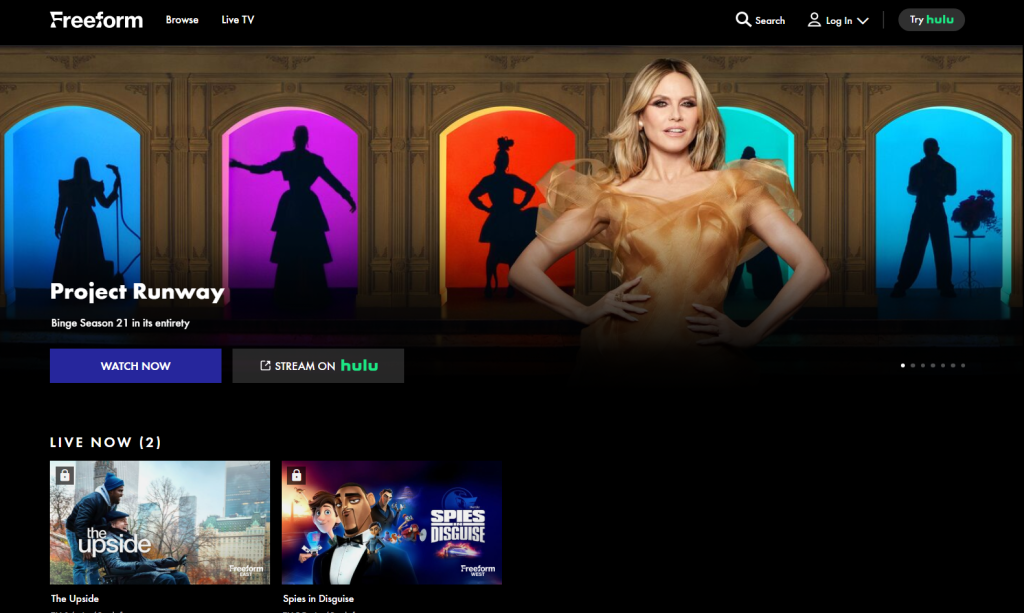
Freeform content is commonly available on the Hulu streaming library. Also, Freeform itself offers a mix of browsing and full episodes online, with more access when you link a TV provider.
Option A: Set up Hulu for on-demand Freeform shows
This is the simplest “on-demand only” path for most people:
- On your phone/computer, create a Hulu account:
- Enter email
- Create password
- Choose the on-demand plan.
- Install the Hulu platform on your TV or other gadgets. Alternatively, use a browser.
- Sign in:
- either directly on TV (email/password), or
- with an on-screen activation code if Hulu shows one.
- Search for the Freeform show you want.
- Start watching.
Option B: Watch Freeform shows on Freeform.com.
On Freeform.com, you can watch shows and other content for free. Linking a TV provider typically unlocks more premium stuff. For this option:
- Open Freeform.com.
- Go to Browse and select a show.
- If it’s locked:
- Choose Link TV Provider (Option 1 steps).
- If it’s unlocked, press play and watch in the browser.