You’re not alone if you’ve seen flashy ads promising “1000+ free channels,” “free Netflix and Disney+,” or a tiny stick that will replace every subscription you pay for. Those ads push a product called the Flixy TV Smart Stick. The marketing promises miracles.
Real users, independent reviewers, and consumer-safety organizations tell a different story. The device under-delivers, customer service disappears, and refund paths often close quickly.

This article will walk you through why the Flixy Smart TV Stick offer is a scam.
What is the Flixy Smart TV Stick?
This device is sold as a tiny HDMI stick. It vows to instantly unlock hundreds or thousands of free channels, apps, and on-demand content. All these without needing costly subscriptions.
The landing pages pledge:
- Plug-and-play simplicity.
- Instant access to thousands of channels and apps.
- No monthly fees or “one-time payment” pricing.
- Special launch discounts, limited stock countdowns, and bulk-buy savings.
What the Flixy Smart TV Stick actually is
If you strip away the ad copy, you’ll find one of three realities of this gadget:
- A generic or rebadged cheap Android TV stick: Cheap hardware that runs Android and can sideload apps, but doesn’t magically unlock paid services. It may require manual setup to install legitimate apps, and it still needs subscriptions. It’s essentially a low-cost streaming device, not a magical content key.
- An empty or non-functional product: Buyers report receiving nothing useful (a cheap HDMI extender, a blank stick, or no delivery at all) after paying. Many of these operations use low-cost shipping or “dropshipping,” which can take months, or they vanish. Trustpilot and ScamAdviser summaries show repeated complaints of delayed or non-delivery.
- A marketing front for subscription or data capture: In some cases, the physical device is a loss leader; the real objective is to capture your payment card, enrolll you into recurring subscriptions you didn’t expect, or harvest personal data for resale. The checkout flow may pre-check “recurring subscription” boxes or funnel you into third-party services.
How the TV stick is marketed
The marketing tells a consistent story, optimized to create impulse buys. It includes:
- Ad creative on social platforms: Flashy short videos showing a family plugging in a stick and watching premium channels. Ad copy promises “no subscriptions” and “limited stock” to force quick decisions.
- Landing pages that mimic legitimate retailers: Product pages that look professional, complete with star ratings, testimonials, and fake “verified buyer” badges. Many reviews on the product page are unverifiable or use stock photo avatars.
- Multiple domains and clones: The same product and copy appear under dozens of domain names. That allows operators to pivot when a domain is flagged or blocked. Scanners like ScamAdviser flag these domains for young registration age.
- Time-limited offers and order scarcity: Timers reset on page refresh, but the urgency works for many buyers. This is a standard conversion trick used by shady merchants.
- Fake “experts” and social proof: A supposed product expert’s quote, a YouTuber “review” that links to the direct sales page, and paid promos from low-tier influencers. Some of those videos appear to be affiliate pushes; others are clearly paid ads that don’t disclose compensation.
How the Flixy Smart TV Stick scamming operation works
Based on user reports and security analyses, here is how this fraud takes place:
- Landing page. You click a social ad (or see a promoted post) promising massive value. You reach a polished-looking landing page with countdowns, testimonials, and “limited stock.”
- Fast checkout with psychological pressure. The site stresses scarcity and applies urgency. It often pre-checks boxes for “priority shipping” or for “membership,” so you accept extras without reading. If you proceed, you enter card data. Many buyers later report unexpected additional charges.
- Charging for extras or subscriptions. After settlement, the streaming stick merchant charges a recurring fee or passes your details to affiliate networks that enroll you in trial subscriptions. Your card statement might show a different merchant name. Several users report mysterious recurring charges and poor refund responses.
- Failed or junk delivery. Either you receive a cheap, generic dongle that does little, or you receive nothing and get excuses about shipping delays. Many complaints describe weeks or months of silence, or shipping that never materializes.
- Data misuse and upsell funnels. Some operations try to upsell “premium activation” or ask you to allow remote access to “activate” the stick. This is a classic vector to install malware or harvest more data. The Better Business Bureau warns scammers may request remote access or gift-card payments for “activation,” both huge red flags.
- Domain swap/clone and repeat. When a domain gets flagged, the operators open a new domain, and the cycle restarts. Site trust scanners find clusters of related domains with similar text and shared infrastructure.
Flixy appears under many domains: flixytvstick.topfitnesschoice.com, flixy-uk.com, tryflixy.com, flixy-tvstick.online, offerplox/e-commerce pages, and more. That diffusion is common when operators try to avoid consumer protection scrutiny
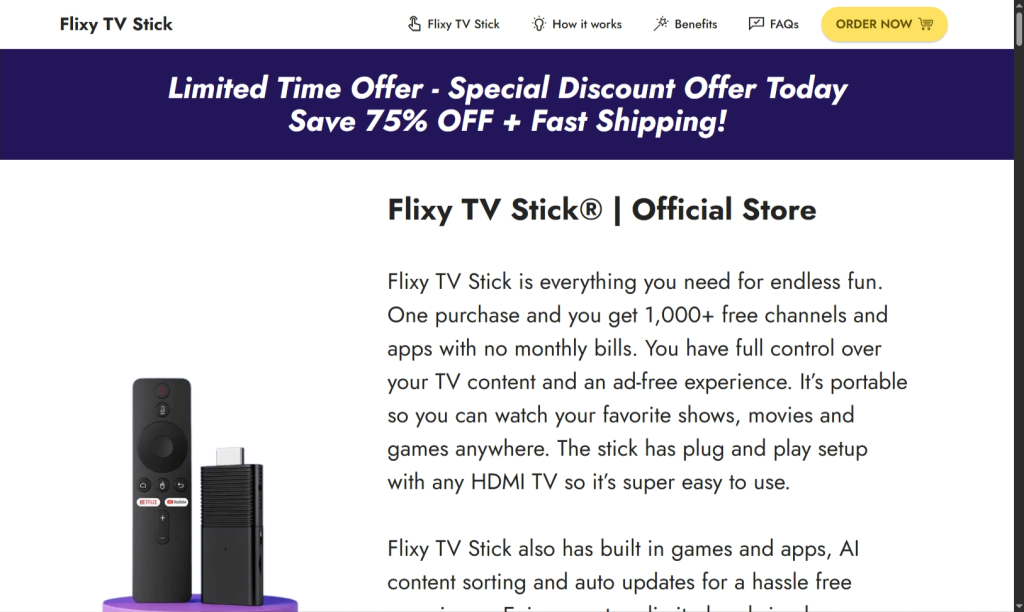
A quick checklist of signs you’re looking at a scam
When a device ad or site triggers multiple items below, don’t buy:
- Countdown timers and “limited stock” that reset on refresh.
- Overly broad “unlocks all premium apps for free” claims.
- Domain is new, WHOIS privacy is used, or the site is flagged by ScamAdviser/GridinSoft.
- No clear physical address or a PO box as the only contact.
- Check out is pre-checked for memberships or hidden recurring charges.
- Reviews only on the vendor site, or Trustpilot reviews that mostly say the same things word-for-word.
- Contact phone numbers that don’t match a known brand; customer support that only offers email and never answers
If you already bought Flixy, do these now.
Act fast. The sooner you move, the better your recovery chance:
- Stop interacting with the seller. Don’t call numbers in pop-ups. Don’t allow remote access. If you have already allowed remote control, disconnect your TV and router immediately.
- Document everything. Save order emails, receipts, bank/PayPal statements, screenshots of the product page, and any chat or email exchanges. You’ll need these for disputes and reports.
- Contact your payment provider and file a dispute. If you paid by credit card or PayPal, open a dispute/chargeback. If you paid by cryptocurrency or gift card, contact the issuer and report the scam; those methods are especially hard to recover.
- Report the scam to the authorities. File complaints with:
- The Federal Trade Commission at ReportFraud.ftc.gov (U.S.).
- Your national consumer protection agency (for example, your country’s consumer affairs office).
- The Better Business Bureau (BBB) and the platform where you found the ad.
- Warn others. Post your experience to consumer forums. Your report discourages repeat victimization by building public evidence.
What reputable streaming sticks actually do (so you know what to expect)
A legitimate stick (Roku, Amazon Fire TV, Google Chromecast, Apple TV) gives you a platform on which you run apps. You must sign in to services and pay their subscriptions (or use their free content).
These devices have brand support, documented specs, long warranty periods, and vendor pages where they publish verified reviews and product support.